
How AI Is Changing WordPress Site Operations
AI is reshaping how WordPress sites are monitored, maintained, and supported. Here's what's real, what's hype, and where it genuinely saves time today.
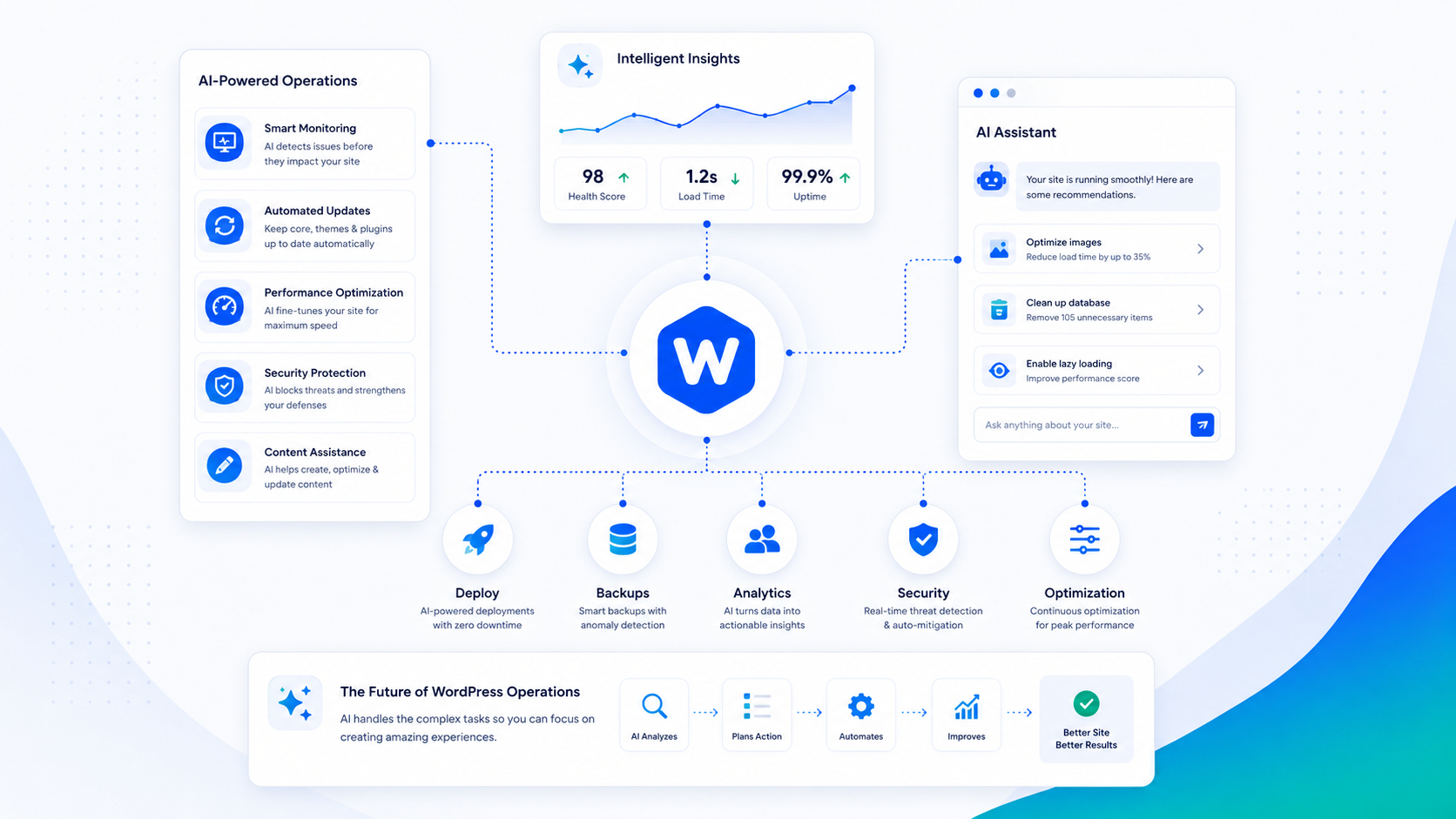
Every WordPress tool vendor is currently describing their product as “AI-powered.” Most of the time, that means a generative text feature or a chatbot. Actual AI application to WordPress site operations — the monitoring, maintenance, and support work that keeps a site running — is less marketed and more useful.
This guide focuses on where AI is producing real operational value in WordPress environments, where it falls short, and what a well-designed AI-assisted operations model actually looks like.
Where AI genuinely helps site operations today
Anomaly detection in traffic and error logs. Site logs generate too much data for a human to review meaningfully on a daily basis. ML-based anomaly detection can distinguish normal traffic patterns from unusual ones — a sudden spike in 500 errors, a crawl rate surge that might indicate scraping, or login failure patterns that suggest an attack in progress. Flagging these events for human review is a task AI does well and humans do inconsistently at scale.
Security event triage. A security monitoring system generates a continuous stream of events: failed logins, file changes, suspicious requests. Most events are noise. AI models trained on WordPress security patterns can classify events by severity and likelihood of genuine compromise, reducing the false-positive burden on the people who review alerts. The goal isn’t autonomous response — it’s surfacing the events that warrant attention from the ones that don’t.
Automated update testing. One of the highest-risk routine tasks in WordPress operations is applying plugin updates without breaking the site. AI-assisted testing tools can run a staging environment through a battery of visual regression tests and functional checks after each update, comparing before-and-after states and flagging meaningful differences for human review. This makes staged updates practical at a scale and cadence that purely manual testing can’t sustain.
Content and site health QA. Broken links, images missing alt text, pages accidentally set to noindex, draft content that published prematurely — these are errors that accumulate without active auditing. Automated crawls with AI classification can surface these issues on a schedule, producing a prioritized list of site health problems rather than raw crawl data.
Support ticket triage and routing. When clients submit support requests, AI can classify the request type (update issue, security concern, performance problem, content question), assess urgency, and route to the right person or queue. This reduces the time between ticket submission and the right expert seeing it — which matters most for urgent issues.
Where AI falls short
Executing changes without human review. An AI system that reads a support request and directly modifies a production WordPress site is not a responsible design pattern. The failure modes are too varied and the consequences too significant. AI can draft a remediation plan, identify the relevant files, and prepare a change — but a human should review and approve before anything touches production.
Novel security incidents. AI models perform well on patterns they’ve been trained on. A novel exploit chain, a sophisticated attacker adapting their approach in real time, or a compromise that combines multiple unusual signals is exactly the situation where AI pattern-matching is unreliable. Incident response requires human judgment, and trying to automate it increases the risk of missing something significant.
Business context. AI doesn’t know that the client’s checkout page can’t go offline during their annual sale, that a specific plugin was intentionally left at an older version for compatibility reasons, or that a content freeze is in effect. Operational decisions that require context about the business — not just the technical state of the site — require a human who holds that context.
Explaining the “why” to clients. When something goes wrong or a decision needs to be made, clients need clear communication from someone they trust, not a generated explanation from a tool. The relationship layer of managed services doesn’t benefit from AI substitution.
AI-assisted support vs. AI-replaced support
The dominant narrative in AI tooling is full automation — replace human labor with AI at every layer and reduce costs. Applied to WordPress support, this means chatbots handling all tickets, automated systems making site changes, and human oversight minimized.
This model optimizes for cost reduction at the expense of reliability and trust. The failure modes matter: an AI system that wrongly classifies a security incident, fails to apply a critical update correctly, or sends a client incorrect guidance about their site has failed in ways that are harder to recover from than a delayed human response.
A more defensible model — the one Wordimatic uses — is AI as a force multiplier for expert humans rather than a replacement for them. AI handles the volume work: log monitoring, anomaly detection, triage, routine task automation. Engineers handle the judgment calls: incident investigation, update decisions with context, client communication, and anything where getting it wrong has real consequences.
The client experience of AI-assisted support is faster triage and fewer things falling through the cracks. The reliability comes from the human oversight layer, not despite the AI layer.
Practical examples from the maintenance loop
A few concrete examples of where AI assistance changes what’s operationally possible:
Update safety. Before applying a batch of plugin updates, an AI-assisted system can compare the update changelog against a known vulnerability database, check the plugin’s recent support thread activity for signs of post-update breakage, and run a visual regression scan against a staging snapshot. A human engineer reviews the flagged issues and makes the update decision. This takes something that was either done manually (slow and inconsistent) or not done (risky) and makes it systematic.
Error pattern recognition. Server logs for a busy WordPress site might generate 50,000 lines per day. An AI model can parse those logs nightly, cluster recurring errors, and surface patterns: “PHP notice from plugin X appearing 3,200 times per day, started 4 days ago after the 2.1.3 update.” That’s a five-minute read for an engineer that would otherwise require processing raw logs.
Proactive performance monitoring. Core Web Vitals data is available in aggregate from Google’s CrUX dataset and in real time from RUM (real user monitoring) tools. An AI monitoring layer can watch for metric degradation — an LCP score trending upward over two weeks before it crosses the “Needs Improvement” threshold — and flag it for investigation before it affects rankings. See the Core Web Vitals guide for what to monitor and why.
What to look for in an AI-assisted provider
If you’re evaluating managed WordPress providers who market AI capabilities, a few questions cut through the noise:
Is there a human reviewing every action before it happens on production? If the answer is no, the automation is substituting for judgment, not augmenting it.
What happens when the AI gets it wrong? Every AI system produces false positives and occasionally misclassifies something significant. The answer should include a clear escalation path and a human who is accountable for reviewing the failure.
What specifically is AI doing vs. what are engineers doing? Vague claims about being “AI-powered” aren’t meaningful. A clear breakdown of which tasks are automated and which involve human judgment tells you what you’re actually buying.
The best AI-assisted operations model is one where the AI makes experts more effective rather than trying to replace the expertise.