
WordPress Hosting vs. Managed WordPress: What's the Difference?
WordPress hosting and managed WordPress aren't the same thing. Here's a clear comparison of what each includes, what it costs, and which one you actually need.
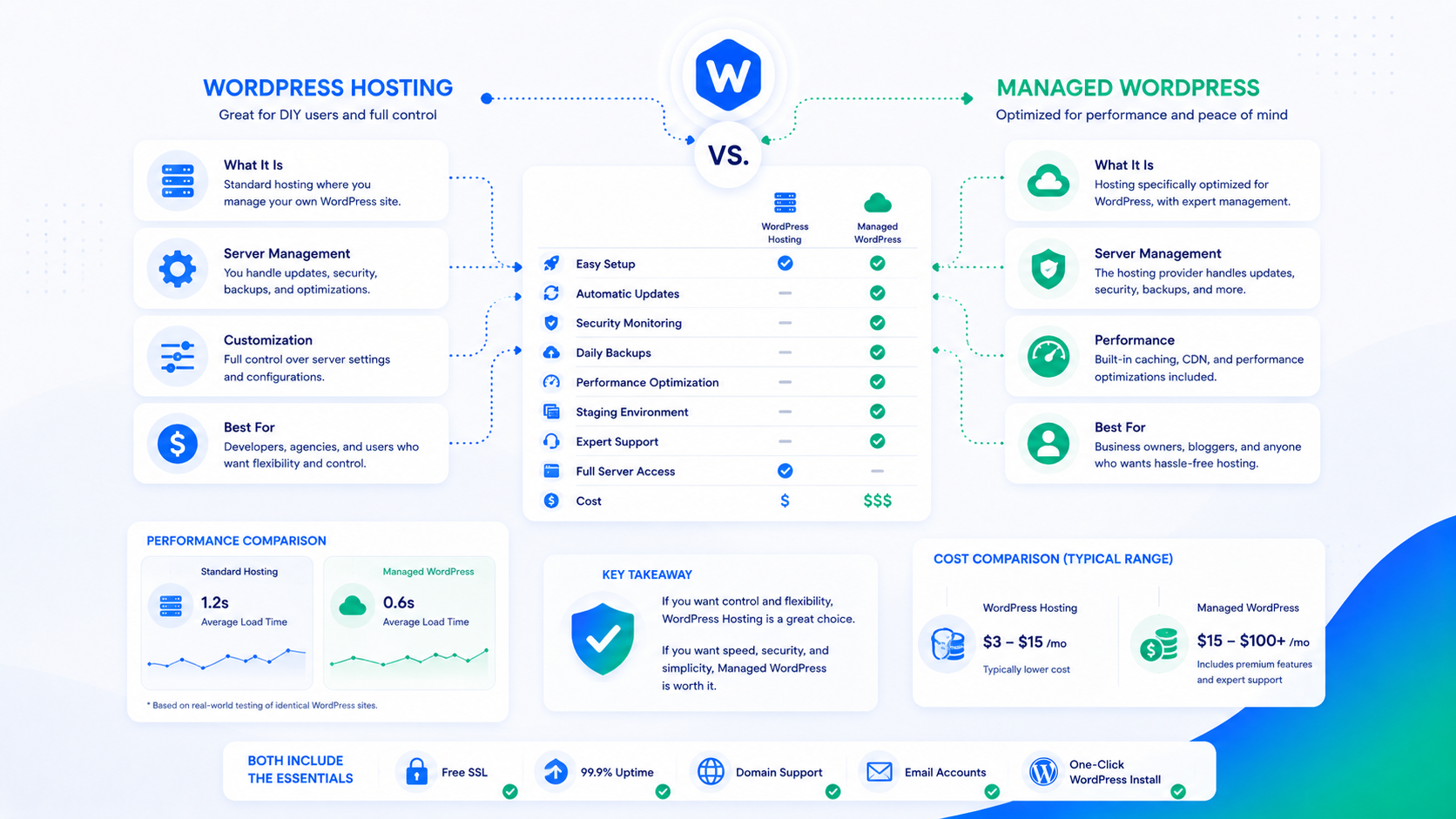
“Managed WordPress” appears on the marketing pages of dozens of hosting providers, often next to price points that suggest it means something basic. It doesn’t mean the same thing everywhere, and the gap between the minimum definition and the full definition matters for how your site runs and how much time you spend maintaining it.
This guide explains what standard WordPress hosting actually includes, what “managed” genuinely adds on top, and how to evaluate what you’re actually getting from a specific provider.
What standard WordPress hosting includes
At its core, WordPress hosting is infrastructure: the servers, network, and software stack that run your site. A typical WordPress hosting plan provides:
Compute and storage. Server capacity (shared or dedicated), disk space for your files and database, and bandwidth for visitor traffic. This is the commodity layer of hosting — the raw infrastructure that your WordPress installation runs on.
PHP and MySQL. The runtime environment WordPress requires. Most hosts provide these; quality varies in terms of PHP version support, available extensions, and MySQL performance.
An interface for managing the server. cPanel, Plesk, or a custom panel for creating databases, managing files, setting up email, and configuring the basics. This is self-service infrastructure management — you do the configuration, the host provides the tools.
Some level of automatic core updates. Many hosts that market WordPress hosting include automatic WordPress core updates. This varies in implementation: some update immediately on release (which can break things), some update on a delay, and some require you to trigger updates manually.
Backups — maybe. Some hosts include daily or weekly backups. Others offer it as a paid add-on. Quality and retention vary significantly, and the backup is usually stored on the same infrastructure as your site, which limits its disaster recovery value.
What standard WordPress hosting does not provide: any expertise about WordPress itself, any monitoring of your site’s behavior, any response to problems beyond “submit a ticket,” or any optimization work. The infrastructure runs; what runs on it is your problem.
What managed WordPress actually adds
Managed WordPress, at its full definition, layers WordPress expertise and operations onto the infrastructure. The additions that matter:
Staged updates with testing. Rather than applying updates automatically (and potentially breaking your site), a managed service applies updates to a staging environment, verifies the site is functioning, and then applies them to production. This is the difference between “we run updates” and “we run updates without breaking your site.”
Backup strategy with tested restores. Off-server backups stored in a separate location from your primary server, with a defined retention policy, and — critically — periodic restore tests to confirm the backups actually work. See the WordPress backup strategy guide for what this should include.
Security monitoring and response. Active monitoring of the site for compromise indicators: file integrity changes, anomalous traffic patterns, vulnerability disclosures affecting your installed plugins. When something flags, someone investigates and responds — not just sends you an alert.
Performance monitoring. Core Web Vitals tracking, TTFB monitoring, and awareness of when performance regressions occur. Not just “the site is up” but “the site is performing as it should.”
WordPress-specific support. When something breaks or you have a question, the person who responds understands WordPress — not just servers. The difference in resolution time and quality between a WordPress-specialist response and a general hosting support response is significant.
Proactive maintenance. The WordPress maintenance checklist is a real cadence of work that managed services handle as part of the engagement. On standard hosting, that work either falls to you or doesn’t happen.
Side-by-side comparison
| Standard WordPress Hosting | Managed WordPress | |
|---|---|---|
| Infrastructure (servers, bandwidth) | Yes | Yes |
| PHP/MySQL environment | Yes | Yes (tuned for WordPress) |
| WordPress core updates | Automatic or manual | Your decision, prepared and checked first |
| Plugin/theme updates | Manual | Staged, checked, reversible |
| Backups | Varies (often same-server) | Off-server, tested restores |
| Security monitoring | None or basic scanner | Active monitoring and response |
| Performance monitoring | Uptime only | Core Web Vitals, TTFB, regression alerts |
| Support expertise | General hosting support | WordPress specialists |
| Staging environment | Usually not included | Included |
| Caching configuration | Self-configured | Pre-configured and tuned |
Cost: what you pay for vs. what you save
Managed WordPress services cost more than standard hosting. The comparison that matters isn’t the monthly price difference — it’s the total cost including your time and the cost of problems that managed services prevent.
Consider a typical scenario on standard hosting: a plugin vulnerability is disclosed, exploitation begins within 24 hours, and your site gets compromised. The cost of remediation — identifying the compromise, cleaning the site, restoring from backup, investigating the entry point, hardening against recurrence — is measured in developer hours. At agency rates, a security incident costs $1,500–$5,000+ to remediate. One incident per year pays for two to three years of managed service on most pricing tiers.
The other real cost on standard hosting is opportunity cost: the time you or your team spend on maintenance tasks (updates, monitoring, backup verification) that a managed service handles automatically. For businesses where that time has a measurable value, the managed service is frequently cheaper on a total cost basis even if the monthly invoice is higher.
Who should choose which
Standard hosting makes sense when:
- You have in-house technical staff with WordPress expertise and time to handle maintenance
- The site is low-traffic and low-risk — a personal project, a development sandbox, or a static brochure site where downtime and security incidents have minimal business impact
- You genuinely enjoy managing the infrastructure and want full control over your environment
Managed WordPress makes sense when:
- The site is business-critical — e-commerce, lead generation, or a client-facing application where downtime or data loss has direct financial consequences
- You don’t have WordPress expertise in-house and don’t want to develop it
- Updates and maintenance are currently being deferred because no one has time to do them properly
- You’ve had a security incident or a broken update and want it to not happen again
The majority of business WordPress sites fall into the second category. The default for a site that matters to the business is to have it managed by someone whose job is to keep it running.
Where Wordimatic fits
Wordimatic sits in a specific part of the managed WordPress market: expert-level operations for sites where the site’s performance directly affects the business. The managed WordPress service covers staged updates, off-server backups, security monitoring, performance tracking, and WordPress-specialist support. The pricing page has details on what’s included at each tier.
The other part of the offering that distinguishes Wordimatic from infrastructure-focused managed hosts is the custom plugin development capability — when off-the-shelf tools fall short, we build what’s needed rather than routing around limitations with plugin stacks.