
Should You Build a Custom WordPress Plugin? When Off-the-Shelf Falls Short
A decision framework for when a custom WordPress plugin beats stacking off-the-shelf plugins — covering cost, maintenance, performance, and long-term risk.
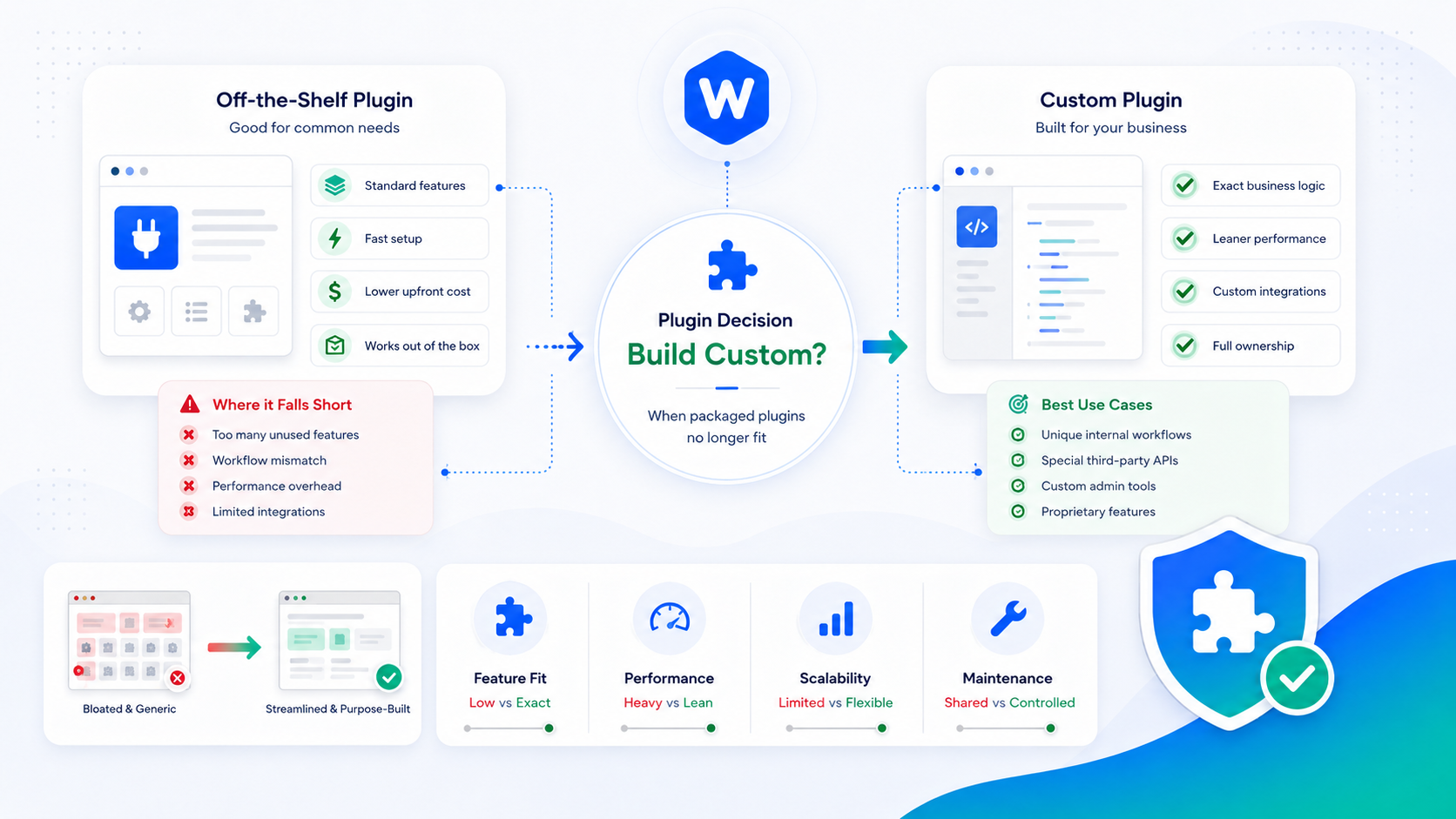
The conventional advice is to use a plugin for everything you can. There’s a plugin for that — for almost anything you can think of, actually — and the economics of using existing software usually make sense. But that advice breaks down at a certain level of specificity, complexity, or business-criticality.
This guide is a decision framework for when to build a custom WordPress plugin rather than reach for an off-the-shelf solution, and what to expect from each path.
The hidden cost of plugin sprawl
The average WordPress site runs 15–25 active plugins. Each one is a dependency with its own update schedule, compatibility surface, support team, and business model. Individually, each plugin looks like a cost-effective choice. Collectively, they create problems that aren’t visible on the day you install them.
Performance overhead. Every active plugin adds PHP execution time and often frontend assets (CSS and JavaScript) to every page load. Plugins designed for general use load their full feature set even when your site uses a fraction of it. Ten plugins that each add 50ms of overhead add 500ms to your TTFB before you’ve written a line of code.
Conflict surface. WordPress plugins interact through hooks and filters. Two plugins that both hook into the same event, or that both modify the same database tables, will eventually conflict. Debugging a conflict between two third-party plugins whose code you don’t own is one of the most time-consuming activities in WordPress development.
Security exposure. Each plugin is third-party code with access to your database, your files, and your users’ data. Plugin vulnerabilities are the leading cause of WordPress compromises. The more plugins you run, the larger your attack surface. The WordPress plugin management guide covers how to audit and reduce this risk.
License fees and vendor dependency. Premium plugins with annual renewal requirements aren’t free. More importantly, when a plugin vendor raises prices, discontinues the product, or gets acquired, your business-critical feature is at risk. That’s a dependency you don’t own.
Signs you’ve outgrown off-the-shelf
These patterns indicate that plugin sprawl is becoming the problem rather than solving it:
You’re using 5% of a plugin’s feature set to get the one thing you actually need, and that plugin ships 200KB of JavaScript to the frontend for features your site doesn’t use.
Multiple plugins are fighting over the same functionality — two form plugins, two SEO plugins, or three things that all want to modify the checkout. You’re only using one feature from each, but you can’t consolidate.
You can’t update a plugin without something breaking. Your customizations are built on top of plugin functionality that isn’t stable across updates, or you’ve modified plugin files directly (which breaks on every update).
You’ve built a workaround for a limitation of an off-the-shelf plugin, and that workaround has its own plugin, and now you have two dependencies instead of one.
Your recurring plugin license costs are material relative to what you’re getting, particularly for plugins that haven’t been meaningfully updated in years.
A decision framework: build vs. buy
Four questions that shape the decision:
How unique is the requirement? If your requirement is something many WordPress sites have (contact forms, SEO metadata, caching), off-the-shelf is almost certainly the right call. The more specific and idiosyncratic the requirement — integrating with your internal CRM, a custom pricing engine, a workflow specific to your business — the stronger the case for custom.
What is the real total cost of ownership of the off-the-shelf option? Don’t compare the custom build cost against the annual license fee. Compare it against the full cost: license fee × lifetime of the feature + developer time for customization + developer time for troubleshooting conflicts + lost business value when the plugin causes downtime or data problems. That calculation often closes the gap.
Who maintains it long-term? A custom plugin you build requires someone with WordPress development expertise to maintain. If that’s not available internally, you need a development partner. Off-the-shelf plugins push the maintenance burden to the vendor, which is genuinely valuable — until the vendor abandons the product or deprioritizes your use case.
How business-critical is the feature? A plugin that runs your checkout, your membership access control, or your client portal is a different risk profile than a plugin that adds sharing buttons. Business-critical features justify the control and stability of a custom build more readily than peripheral features do.
What custom plugins do well
A well-built custom plugin does exactly what your site needs and nothing else. No settings panels for features you won’t use. No database tables for data you don’t store. No frontend assets for functionality that doesn’t touch the frontend.
Tight integration with your specific data model means the plugin can make assumptions that a general-purpose plugin can’t. A custom integration with your CRM doesn’t have to support fifteen other CRM platforms — it just has to support yours, which means the code is simpler, the queries are faster, and the edge cases are your edge cases.
Full ownership means no license expiry, no vendor lock-in, and no business decision by a third party affecting a feature your operations depend on. You can read the code, audit it, modify it, and hand it to another developer without restriction.
What custom plugins actually cost
It’s worth being direct about this. A well-scoped custom plugin built by an experienced WordPress developer typically costs $1,500–$5,000 for the initial build, depending on complexity. Ongoing maintenance — updates for WordPress core compatibility, bug fixes, and feature additions — is a recurring cost of roughly $500–$1,500 per year for an actively maintained plugin.
That cost is frequently justified for business-critical features and almost never justified for peripheral functionality with good off-the-shelf alternatives. The break-even point depends on the annual off-the-shelf cost, the developer time the off-the-shelf option consumes, and how long you intend to run the feature.
One cost that’s often underestimated: testing. A custom plugin needs a test suite or a rigorous manual testing protocol before each WordPress core update. That work is real and recurs on WordPress’s release schedule.
How Wordimatic approaches custom builds
When a prospective client asks about custom plugin development, we start with a scoping conversation about the requirement — not to sell the build, but to understand whether a custom plugin is actually the right answer. Sometimes it is. Sometimes a well-configured off-the-shelf plugin handles 95% of the requirement and a small amount of custom code fills the gap more cost-effectively than a full custom plugin.
When custom is the right call, we scope the plugin to the specific requirement, build it against the WordPress coding standards, document it, and set it up for ongoing maintenance. The custom plugin development service page describes how engagements work. You can also review the plugins we’ve built for our managed clients for examples of what purpose-built WordPress plugins look like in practice.