
WordPress Hooks and Filters: A Plain-English Guide for Developers
Actions and filters are how WordPress lets you modify behavior without editing core files. Here's how they work, when to use each, and how to write them correctly.
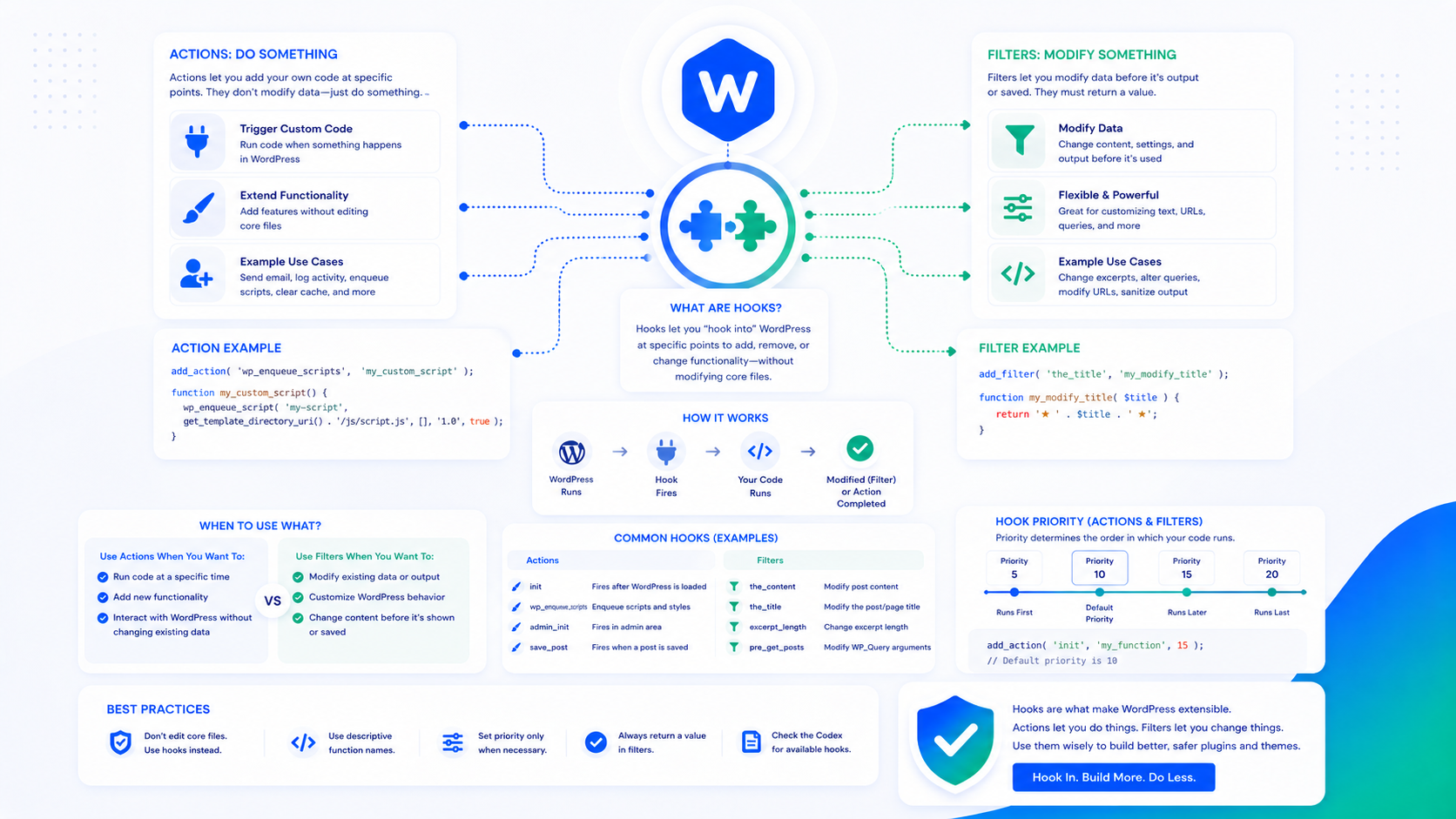
WordPress is built on an event system. At hundreds of points during WordPress’s execution — when a post is saved, when a page is loaded, when a menu is rendered — WordPress fires named events called hooks. Any code registered to respond to those events runs at that moment.
This is how WordPress enables plugins and themes to modify behavior without editing core files: you hook into the system at the right point, run your code, and optionally modify the data being processed. It’s one of the most elegant aspects of WordPress’s architecture, and understanding it is foundational to any WordPress plugin or theme development.
Actions vs. filters: the core distinction
WordPress has two types of hooks: actions and filters.
Actions fire at a specific point in WordPress’s execution and allow you to run code at that point. They don’t return a value that modifies the execution flow — they’re about performing a task at the right moment.
Examples of actions:
init— fires after WordPress finishes loading, before headers are sentsave_post— fires after a post is saved to the databasewp_enqueue_scripts— fires when WordPress is loading scripts and styles for the frontend
Filters fire at a specific point and pass data through registered functions, expecting each function to return the (possibly modified) data. They’re about transforming values.
Examples of filters:
the_content— filters post content before it’s displayedthe_title— filters post title before it’s outputupload_mimes— filters the list of allowed file upload types
The practical difference: if you need to DO something at a point in WordPress’s execution, use an action. If you need to MODIFY something, use a filter.
add_action and add_filter
The functions for registering hooks follow the same pattern:
add_action( $hook_name, $callback, $priority, $accepted_args );
add_filter( $hook_name, $callback, $priority, $accepted_args );
$hook_name— the name of the hook to listen for$callback— the function to run when the hook fires$priority— when to run relative to other callbacks on the same hook (default: 10, lower runs earlier)$accepted_args— how many arguments to pass to the callback (default: 1)
A simple action example — running a function when WordPress initializes:
add_action( 'init', 'my_custom_initialization' );

function my_custom_initialization() {
    // Code here runs on init
    register_post_type( 'product', [...] );
}
A filter example — adding text after post content:
add_filter( 'the_content', 'add_disclaimer_to_posts' );

function add_disclaimer_to_posts( $content ) {
    if ( is_single() ) {
        $content .= '<p class="disclaimer">This post represents our current understanding...</p>';
    }
    return $content; // Always return the content in a filter
}
The critical rule for filters: always return the value. A filter callback that doesn’t return anything returns null, which replaces the content with nothing. Every filter callback must return a value.
Priority and execution order
When multiple callbacks are registered to the same hook, priority determines the order. Lower numbers run first. The default priority is 10.
// This runs first (priority 5)
add_filter( 'the_content', 'modify_content_early', 5 );

// This runs second (default priority 10)
add_filter( 'the_content', 'modify_content_default' );

// This runs last (priority 20)
add_filter( 'the_content', 'modify_content_late', 20 );
If two callbacks share the same priority and hook name, they run in the order they were registered (the order add_filter() was called).
Priority becomes important when:
- You need to run after another plugin’s modification (set a higher priority number)
- You need to run before WordPress’s default processing (set a lower priority number)
- You’re modifying data that another plugin has already modified
WordPress core uses priority 10 for most of its own callbacks, leaving room below (1–9) for early modifications and above (11+) for late ones.
accepted_args: receiving multiple arguments
Some hooks pass multiple arguments to callbacks. By default, callbacks only receive one argument. To receive more, specify $accepted_args:
// save_post passes three arguments: post ID, post object, and whether it's an update
add_action( 'save_post', 'on_post_saved', 10, 3 );

function on_post_saved( $post_id, $post, $update ) {
    if ( $update ) {
        // Post was updated, not created
    }
}
Check the WordPress developer documentation for any hook to see what arguments it passes. Using $accepted_args lower than the actual argument count means your callback receives fewer arguments than are available — this doesn’t cause errors, but you won’t have access to all the data.
do_action and apply_filters: creating your own hooks
If you’re building a plugin, you should create your own hooks so other plugins and themes can extend your functionality without modifying your code:
// In your plugin, fire a custom action at a key point
do_action( 'my_plugin_after_processing', $processed_data );

// Fire a custom filter and use the return value
$output = apply_filters( 'my_plugin_output', $default_output, $context );
This is how all well-designed WordPress plugins work — they expose hooks that let others extend behavior. A plugin that’s entirely self-contained with no hooks can only be extended by forking it.
Removing hooks
To remove a callback registered by another plugin or theme:
remove_action( $hook_name, $callback, $priority );
remove_filter( $hook_name, $callback, $priority );
The $priority must match exactly what was used when the callback was added. Removing hooks requires running after they’ve been registered — use a hook that fires after the plugin in question has loaded.
Removing a WordPress core filter or action:
// Remove default WordPress automatic paragraph addition
remove_filter( 'the_content', 'wpautop' );
Anonymous functions and hook removal
Using anonymous functions (closures) as callbacks is convenient but creates a problem: you can’t remove them later, because you don’t have a reference to pass to remove_action():
// This cannot be removed later
add_action( 'init', function() {
    // do something
});
For hooks that may need to be removed — including from your own plugin — use named functions and store references if necessary. Anonymous functions are fine for simple cases that won’t be removed.
Common mistakes
Forgetting to return in filters. The most common filter bug. Test your filters by checking that the original data still appears — if content disappears after adding a filter, you forgot return.
Hooking too early. Some WordPress functions aren’t available until specific hooks fire. Using get_permalink() before the init hook, or calling wp_enqueue_scripts directly from a plugin file instead of hooking it to wp_enqueue_scripts, produces errors or silent failures. Use the appropriate hook for the function you need.
Duplicate hook registration. If your hook registration code runs multiple times (loaded in a loop, called in both a plugin file and a template), the callback runs multiple times per hook fire. Wrap registration in a check or use the plugin load lifecycle correctly.
Wrong priority for dependency. If your code modifies data that another plugin also modifies, getting the priority wrong means you’re operating on unmodified data or having your modification overwritten.
The hooks system is also central to how custom WordPress plugins interact with WordPress and with each other. Understanding it well is the foundation for extending WordPress correctly. For custom post types and other structural extensions, the custom post types guide covers how CPT registration uses the init action.